

AirMagic vs Luminar: What to Choose for Drone Photo Editing
AirMagic photo editor from Skylum has long been popular among drone photography enthusiasts. As technology continues to evolve, it's crucial to stay ahead of the curve. That's why we're excited to introduce you to AirMagic's successor, Luminar and show you why it’s the top choice for 2024
View plansWhy Luminar is a Must-Have for
Drone Photography
Enhanced User Experience
Luminar’s interface is designed for efficiency, offering users a clean and intuitive workspace. By focusing on simplicity, users can quickly access powerful tools without unnecessary complexity. Additionally, Luminar features robust Library Management for easy organization and access to your photo collection.
.webp)
Next-Generation Editing Tools
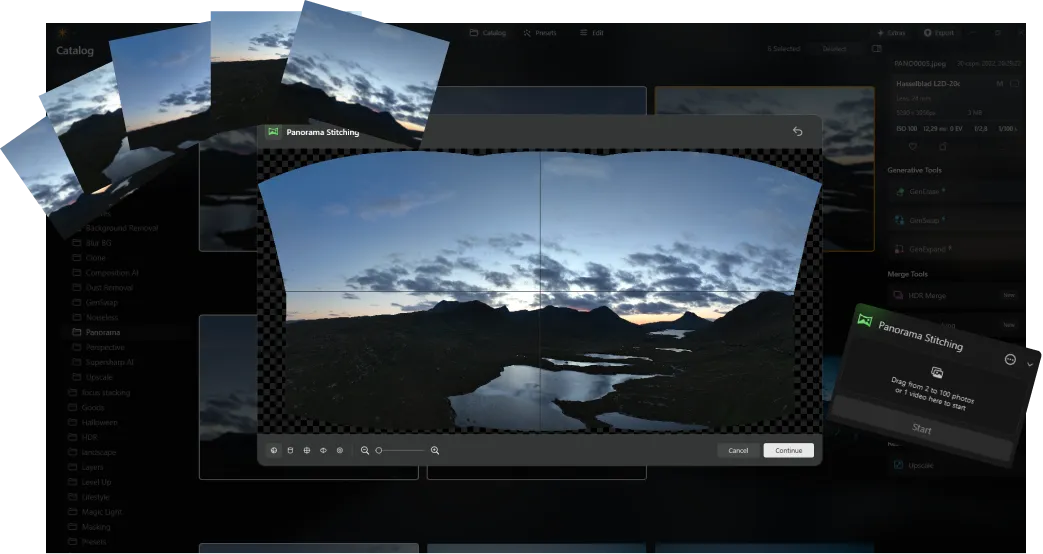
Luminar offers advanced features like AI-driven Panorama Stitching, which effortlessly merges multiple drone shots into stunning panoramas. Additionally, it includes a suite of new generative tools designed to enhance photos and unlock your full creative potential.
Always Up-to-Date
As a newer and more advanced product than Skylum AirMagic, Luminar is continuously updated to stay compatible with the latest photography tools. This ongoing support ensures that users with new equipment can seamlessly integrate Luminar into their editing workflow, providing a smooth and efficient experience.


AirMagic vs Luminar: A Brief Overview of Key Differences
| Aspect | AirMagic | Luminar |
|---|---|---|
Library Management |  |  |
Batch Processing | | |
AI-Powered Features | | |
Transparency PNG Support | | |
Support for New Cameras | | |
Styles and LUTs | | |
Sync Adjustments | | |
System Sounds | | |
Native Support for ARM and Apple M | | |
Aurora HDR
Luminar
Single image tone mapping
Single bracket HDR merge
Batch Processing
Auto batch processing detection
Improved HDR brackets detection in Batch Processing
New Cameras Support
Batch file naming and export quality settings
Export presets saving
Up to ~1.5x-1.8x faster on different OS
Wide functionality

An application & plugin for macOS & Windows


.webp)

Keep your workflow, expand your possibilities
Want to get all the benefits of Luminar but have an established Lightroom workflow? Great news! You can use all the power of Luminar within a plugin for Lightroom without changing up your usual post-production process.

An application & plugin
For macOS & Windows
- High-performance AI editor
24/7 technical support
30-day money back guarantee
Join our communities

